教程 6 - 把它放上网!
除了支持移动平台,Toga 控件工具包还支持网络!使用与部署桌面和移动应用程序相同的应用程序接口,您可以将应用程序部署为单页网页应用程序。
概念验证
Toga Web 后端是所有 Toga 后端中最不成熟的一个。它已经足够成熟,可以展示一些功能,但很可能会有问题,而且会缺少许多其他平台上可用的控件。目前,Web 部署应被视为“概念验证”–足以展示可以做什么,但还不足以作为严肃开发的依据。
如果您在教程的这一步遇到问题,可以跳到下一页。
作为网页应用程序部署
作为单页面 Web 应用程序部署的过程遵循相同的熟悉模式–创建应用程序,然后构建应用程序,然后运行它。不过,Briefcase 也有一点小聪明;如果您尝试运行应用程序,而 Briefcase 确定该应用程序尚未针对目标平台创建或构建,那么它会为您执行创建和构建步骤。由于这是我们第一次为网络运行应用程序,我们可以用一条命令执行所有三个步骤:
(beeware-venv) $ briefcase run web

[helloworld] Generating application template...
Using app template: https://github.com/beeware/briefcase-web-static-template.git, branch v0.3.18
...

[helloworld] Installing support package...
No support package required.

[helloworld] Installing application code...
Installing src/helloworld... done

[helloworld] Installing requirements...
Writing requirements file... done

[helloworld] Installing application resources...
...

[helloworld] Removing unneeded app content...
Removing unneeded app bundle content... done

[helloworld] Created build/helloworld/web/static

[helloworld] Building web project...
...

[helloworld] Built build/helloworld/web/static/www/index.html

[helloworld] Starting web server...
Web server open on http://127.0.0.1:8080

[helloworld] Web server log output (type CTRL-C to stop log)...
===========================================================================
(beeware-venv) $ briefcase run web

[helloworld] Generating application template...
Using app template: https://github.com/beeware/briefcase-web-static-template.git, branch v0.3.18
...

[helloworld] Installing support package...
No support package required.

[helloworld] Installing application code...
Installing src/helloworld... done

[helloworld] Installing requirements...
Writing requirements file... done

[helloworld] Installing application resources...
...

[helloworld] Removing unneeded app content...
Removing unneeded app bundle content... done

[helloworld] Created build/helloworld/web/static

[helloworld] Building web project...
...

[helloworld] Built build/helloworld/web/static/www/index.html

[helloworld] Starting web server...
Web server open on http://127.0.0.1:8080

[helloworld] Web server log output (type CTRL-C to stop log)...
===========================================================================
(beeware-venv) C:\...>briefcase run web

[helloworld] Generating application template...
Using app template: https://github.com/beeware/briefcase-web-static-template.git, branch v0.3.18
...

[helloworld] Installing support package...
No support package required.

[helloworld] Installing application code...
Installing src/helloworld... done

[helloworld] Installing requirements...
Writing requirements file... done

[helloworld] Installing application resources...
...

[helloworld] Removing unneeded app content...
Removing unneeded app bundle content... done

[helloworld] Created build\helloworld\web\static

[helloworld] Building web project...
...

[helloworld] Built build\helloworld\web\static\www\index.html

[helloworld] Starting web server...
Web server open on http://127.0.0.1:8080

[helloworld] Web server log output (type CTRL-C to stop log)...
===========================================================================
这将打开一个网络浏览器,指向
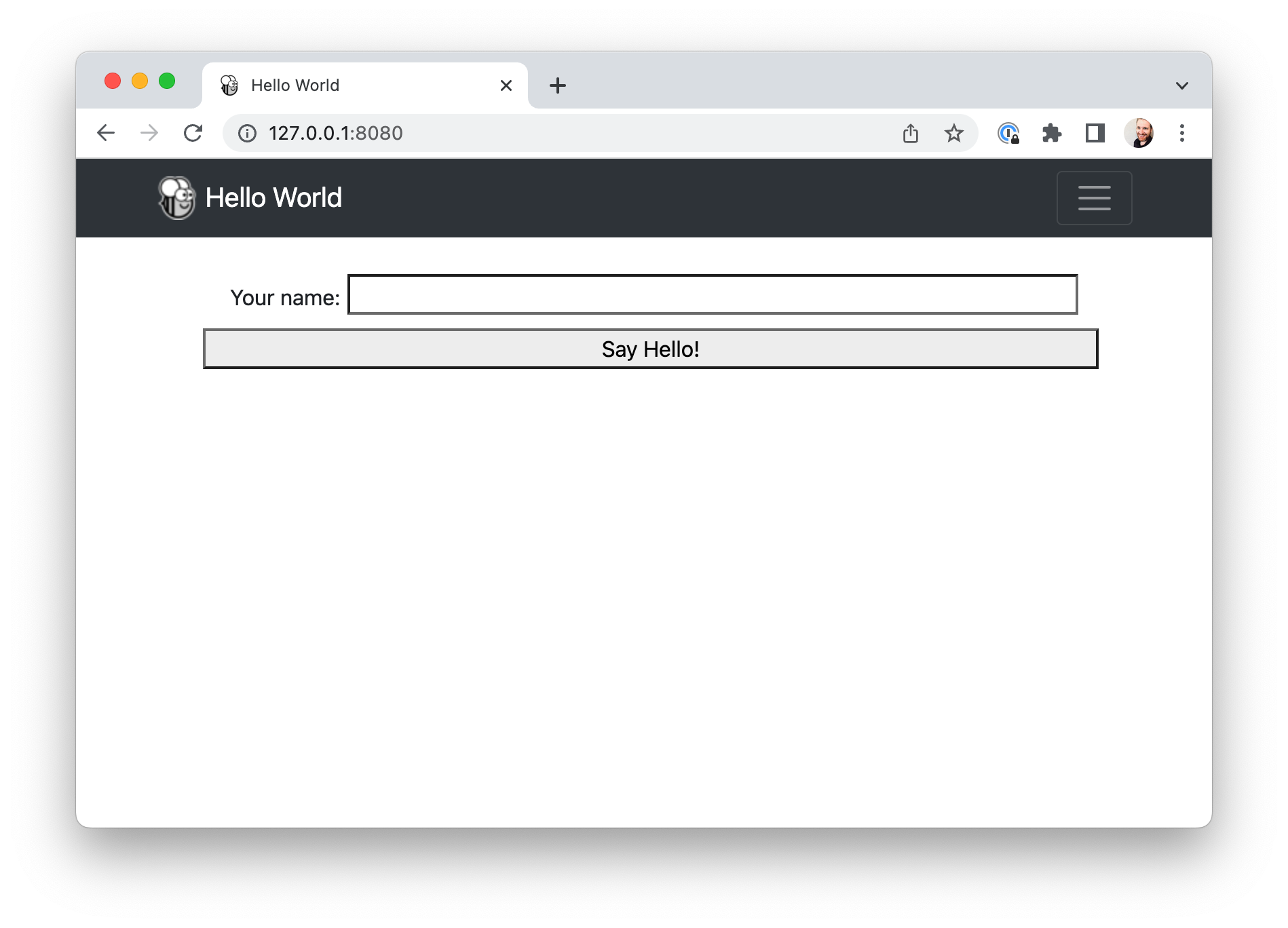 。
。
如果输入您的姓名并点击按钮,就会出现一个对话框。
这是怎么工作的?
此网络应用程序是一个静态网站 – 一个 HTML 源页面,包含一些 CSS 和其他资源。Briefcase
启动了一个本地网络服务器来提供该页面,以便您的浏览器可以查看该页面。如果您想将此网页进入生产,可以将 www
文件夹中的内容复制到任何可以提供静态内容的网络服务器上。
但是,当你按下按钮时,你运行的是 Python 代码......这是怎么做到的呢?Toga 使用 PyScript 在浏览器中提供 Python 解释器。公文包将应用程序的代码打包成 PyScript 可以在浏览器中加载的轮子。加载页面时,应用代码会在浏览器中运行,并使用浏览器 DOM 构建用户界面。当您点击按钮时,该按钮会在浏览器中运行事件处理代码。
发布网络应用程序
若需将此网络应用发布至互联网,您也可尝试使用PythonAnywhere Briefcase插件。该插件的教程将承接本页内容,引导您完成打包及发布至PythonAnywhere的操作流程。
下一步
虽然我们现在已经在桌面、手机和网络上部署了这个应用程序,但该应用程序相当简单,不涉及任何第三方库。我们可以在应用程序中包含 Python 包索引 (PyPI) 中的库吗?请访问 教程7 了解详情…